![streamline-logo-color-2025-1.png]](https://support.getstreamline.com/hs-fs/hubfs/chub_backup/streamline-logo-color-2025-1.png?height=32&name=streamline-logo-color-2025-1.png)
Last updated: July 2026
Our Approach to Support
Our support team focuses on guiding you through solutions and helping troubleshoot issues so you can confidently manage your Streamline site.
Before submitting a support ticket, we recommend checking the Knowledge Base or using the AI assistant. Many common questions and how-to guides are available and can help you find answers quickly.
If you're unable to find the information you need, the best way to get help from our team is to submit a support ticket. Tickets allow us to review your request, gather the right information, route it to the appropriate team member, and provide clear guidance tailored to guide you through the steps needed to resolve it.
What to Expect from Support
When you submit a support ticket, our team will:
- Explain how to resolve the issue
- Provide steps you can follow in the future
- Share helpful articles or documentation
- Walk through the process with you when needed
Recommended Support Path
-
Search the Knowledge Base
Find step-by-step instructions, guides, and videos for common tasks. -
Ask the AI Assistant
Get quick answers and links to relevant help articles. -
Submit a Support Ticket
If you still need help, our team will review your request and guide you through the steps needed to resolve it. -
Schedule Office Hours
For more complex questions, you can schedule time with a support specialist. Office Hours are Zoom meetings where you can share your screen so we can walk through the solution together.
Support Options
Search the Knowledge Base
Many questions can be answered instantly using the resources available in the Support Center.
Our Knowledge Base contains step-by-step guides, walkthroughs, and best practices for managing your site.
You can:
-
Search for answers using the search bar
-
Browse articles by category
-
Follow tutorials for common tasks
This is often the fastest way to find an answer without waiting for support.
Tip: Bookmark https://support.getstreamline.com for one‑click access.
Ask the AI Assistant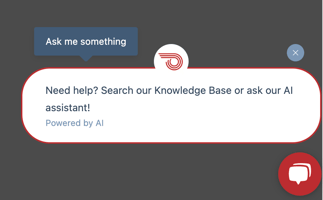
When you are logged into your Streamline site, you will see the AI Assistant in the bottom-right corner.
The assistant can:
-
Answer questions using our Knowledge Base
-
Help you find relevant articles
-
Guide you toward the right solution
If the assistant cannot resolve your issue, it can help create a support ticket for our team to review.
Submit a Support Ticket
After checking the Knowledge Base and checking with the AI assistant, if you still need support, please submit a Support Ticket using the Support form or from within your website.
Tickets allow us to properly review your request and provide clear guidance.
With a ticket, you can:
-
Describe the issue in detail
-
Include links
-
Ensure your request is routed to the right specialist
-
Receive updates by email as your issue is reviewed
-
You may include multiple issues in one ticket.
Once your ticket is submitted, you will receive an email confirmation with your case number, and a member of our team will follow up. Reply to that email to add more info if needed.
👉 Submit a Support Ticket
🌐 Accessing support inside of your website
If you have already submitted a ticket, no need to call. Our team will follow up soon.
Common Support Items
-
Feature Requests & Feedback
We’re always improving Streamline and love your ideas. Submit feedback directly in the ticket form. -
Billing & Invoice Questions
For invoice copies, payment method updates, or W‑9 requests, visit our billing portal.
👉 Manage Billing
✉️ Send an email to accounting@civicplus.com -
Need help with PDF Accessibility?
👉 Learn about DocAccess -
Emergency After‑Hours Help
If your public‑facing site is down outside of business hours, please submit a ticket with the category of "Site Down" or email streamline-support@civicplus.com with “Urgent” in the subject line. Our on‑call team member will respond as soon as possible.
👉 What Can I Do If My Website Seems Down?
Email Support — opens a ticket automatically
Drop us a line at streamline-support@civicplus.com , and a support ticket will be created automatically for you. You’ll receive an email confirmation with your case number. Reply to that email to add more info if needed. Please see above for more information on tickets.
Schedule Office Hours
Prefer to walk through something live? Schedule Office Hours to meet with a support specialist on Zoom. You can share your screen so we can troubleshoot together and walk through solutions step-by-step.
Slots are available multiple times each week, pick the time that best works for you.
Phone support
Phone support is available for quick questions. If we are unable to answer your call, it means our team is already assisting another customer.
Please do not call multiple times. Leave a voicemail or submit a support ticket, and we will respond as soon as we are available. Voicemails automatically create a support ticket so our team can follow up.
For more complex questions or troubleshooting, we recommend scheduling Office Hours. These Zoom meetings allow you to share your screen so a support specialist can walk through the solution with you. Same-day meetings are typically available.
Mon–Fri, 9:00 AM to 5:00 PM (PT)
Calls only, no text messages.
If you have already submitted a ticket, no need to call. Our team will follow up soon.
📞 General support: (916) 238‑1811
📞 Billing questions: (888) 228-2233
Still Need Help?
If you cannot find the answer in the Knowledge Base or through the AI assistant, please submit a support ticket so our team can assist you.
Tickets allow us to review the details of your request and provide the best guidance for resolving the issue.